

How to Reset or Fix a Broken DNS Zone
If your domain is already pointing to Vivint Host and fully propagated, you may reset the DNS zone from your control panel. This process is useful if DNS records are misconfigured, missing, or if you're troubleshooting issues like stuck propagation or failed domain resolution.
Resetting the DNS zone will restore all DNS records to their default values - including A, CNAME, MX, and TXT records - so your domain works smoothly with Vivint Host’s hosting platform.
What Happens When You Reset the DNS Zone?
- All existing DNS records will be removed.
- Default DNS records required by Vivint Host will be automatically restored.
- Any custom records (e.g., mail service, third-party apps) will need to be re-added after the reset.
Method 1: For Domains Registered at Vivint Host
If your domain was purchased directly from Vivint Host, follow these steps:
Step 1: Access Domain Settings
- Log in to your Vivint Host Dashboard.
Navigate to the Domains section.
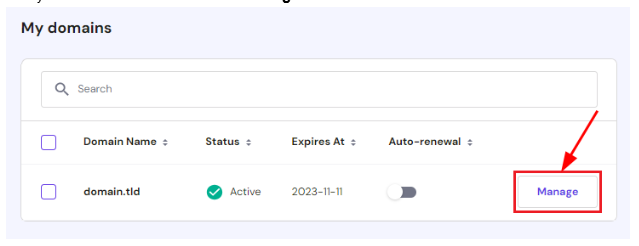
Find your domain in the list and click Manage.
Step 2: Open DNS Settings
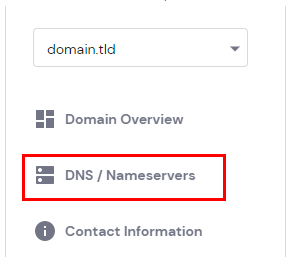
From the left-hand menu, select DNS / Nameservers.
Step 3: Reset the DNS Zone
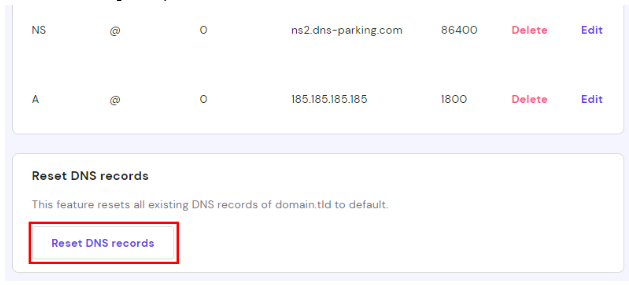
- Scroll to the bottom of the DNS Zone page.
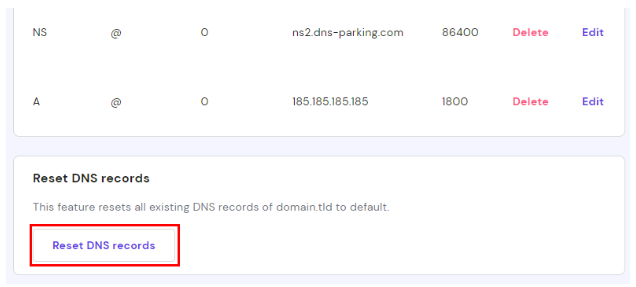
- Click the Reset DNS Records button.
- Read the confirmation message carefully.
Click Reset to begin the process.
After up to 24 hours, your domain’s DNS zone will be fully reset and the default records will be available worldwide.
Method 2: For Domains Registered Externally
If your domain is registered elsewhere but is pointed to Vivint Host using our nameservers, follow these steps:
Step 1: Locate Your Domain
- Go to the Domains section in your Vivint Host account.
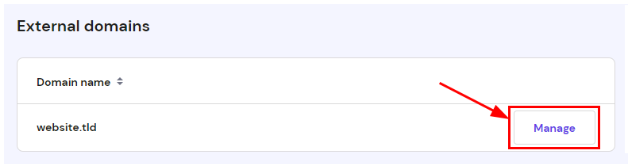
- Scroll to the External Domains list.
Click Manage next to the domain you want to fix.
Step 2: Reset DNS Records
- On the DNS Zone page, scroll to the bottom.
- Click Reset DNS Records.
- Confirm the reset when prompted.
Just like before, it may take up to 24 hours for the changes to fully propagate across the internet.
Important Note:
If your domain is using nameservers from another provider, such as GoDaddy or Cloudflare, the DNS zone must be managed from their platform. Even though you might see DNS records in Vivint Host’s panel, changes won’t apply unless the domain points to Vivint Host nameservers.
Still Need Help?
If you're not sure whether to reset or how to manage a specific record, our 24/7 support team is here to guide you every step of the way.