

How to Verify Domain Ownership with a TXT Record
If you’re connecting a domain to your hosting account at Vivint Host, but the domain is registered under a different account, you’ll need to confirm that you own the domain. To do this, a simple TXT record must be added to the domain’s DNS settings.
This is a common step when the domain and hosting are under different accounts, and it ensures that only the true owner can connect the domain to a website.
Step 1: Get Your TXT Record
- Log in to your Vivint Host account.
- Go to the Websites section in your dashboard.
- Click Add Website and type in the domain name you want to connect.
- If the domain is already linked to another Vivint Host account, you’ll see a message about that.
- Choose the domain and click Next.
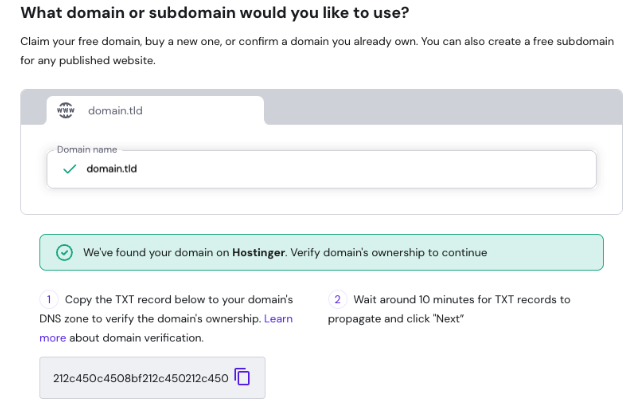
- A screen will appear showing the TXT record you need to add.
Click the Copy button next to the TXT value so you can use it in the next step.
Step 2: Add the TXT Record to Your DNS Settings
Next, you need to add this TXT record to the domain’s DNS zone. Where you do this depends on where your domain’s DNS is managed:
If Your Domain Uses Vivint Host Nameservers:
- Go to hPanel > DNS Zone Editor
- Find your domain
- Add a new TXT record with the following details:
|
Name (Host) |
TXT value |
TTL |
|
@ |
he value that you copied on a previous step |
900 |
If Your Domain Uses Other Nameservers:
- Log in to the provider where your DNS is hosted (for example, GoDaddy, Cloudflare, etc.)
- Open the DNS management section
- Add the TXT record using the same details shown above
Once the record is saved, your domain will begin the verification process.
Step 3: Wait for the Changes to Update
DNS changes don’t take effect instantly. It may take up to 24 hours for the TXT record to fully update across the internet. In many cases, it’s quicker.
After waiting, go back to the Websites section in your Vivint Host account and try adding the domain again. If everything is correct, the verification will be completed and no further action is needed.
Need Help?
If you run into any issues or need help finding where to add the TXT record, our support team is available 24/7 to assist you.