

How to Create and Manage DNS Records (A, CNAME, MX, TXT, SRV)
DNS (Domain Name System) is what connects your website name (like yourdomain.com) to the actual server it’s hosted on. It’s the backbone that translates user-friendly domain names into IP addresses so browsers know where to go.
At Vivint Host, we provide fast and secure cloud hosting with built-in DNS management through cPanel, making it easy for you to manage your domain’s DNS records—no matter your experience level.
In this guide, we’ll walk you through how to create, modify, and delete DNS records directly from your cPanel account.
Step-by-Step: Managing DNS Records in cPanel
Step 1: Log in to Your cPanel
Start by logging into your Vivint Host cPanel account. You can access cPanel from your client dashboard or directly via the link provided in your welcome email.
Step 2: Go to the Zone Editor
Once you're in cPanel:
- Scroll down to the Domains section.
- Click on the Zone Editor icon.
This is where you’ll manage all DNS-related configurations for your domains.
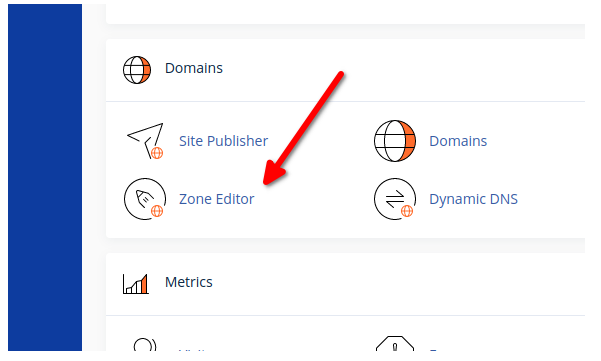
Step 3: Choose the Domain You Want to Edit
In the Zone Editor, you’ll see a list of all domains connected to your hosting account.
- Find the domain you want to edit.
- Click the Manage button next to it.
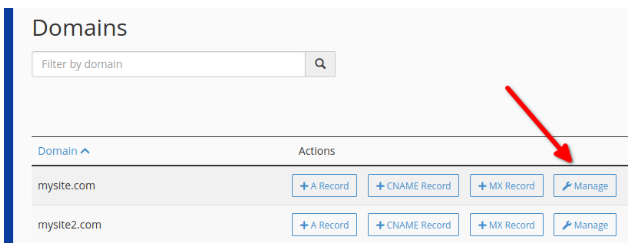
Step 4: Add, Edit, or Delete DNS Records
Now, you’re inside the DNS management dashboard for your selected domain.
From here, you can:
- Add a new DNS record
- Edit an existing record
- Delete records you no longer need
Vivint Tip: If your domain is using our default nameservers, we’ve already set up the basic A (Address) record for you—pointing your domain to your hosting server’s IP.
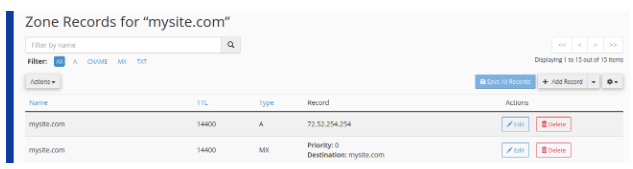
Step 5: Creating a New DNS Record
To create a new record:
- Use the dropdown to select the record type (A, MX, CNAME, TXT, etc.)
- Enter the required information into the fields.
- Click Save Record when you’re done.
You can repeat this process to add multiple records if needed.
Types of DNS Records & Their Uses
1. A Record (Address Record)
- Purpose: Links a domain (e.g., yourdomain.com) to an IPv4 address.
- Example: Directs visitors to your server’s IP (like 192.0.2.1).
2. AAAA Record (IPv6 Address Record)
- Purpose: Similar to an A record, but for IPv6 addresses (e.g., 2001:0db8:85a3::8a2e:0370:7334).
3. MX Record (Mail Exchange Record)
- Purpose: Routes emails to the correct mail servers.
- Example: Directs @yourdomain.com emails to Google Workspace or Microsoft 365.
4. CNAME Record (Canonical Name Record)
- Purpose: Creates an alias for a domain (e.g., shop.yourdomain.com → store.thirdparty.com).
- Note: Never use CNAME for the root domain (yourdomain.com).
5. TXT Record (Text Record)
- Purpose: Used for verification (e.g., SPF, DKIM, DMARC) to prevent email spoofing.
- Example: v=spf1 include:_spf.google.com ~all (for Gmail authorization).
6. CAA Record (Certification Authority Authorization)
- Purpose: Specifies which Certificate Authorities (CAs) can issue SSL certificates for your domain.
7. SRV Record (Service Record)
- Purpose: Helps locate specific services (e.g., VoIP, SIP, or gaming servers).
Need Help? Vivint Host Support is Here!
Managing DNS records can be tricky, but Vivint Host’s 24/7 expert support is just a click away. If you run into issues or need guidance, contact our team anytime!
By following this guide, you’ll have full control over your domain’s DNS settings-ensuring a fast, secure, and reliable hosting experience with Vivint Host.