

How to Unlock a Domain and Get an EPP Code
Transferring your domain to another registrar? One of the first steps is unlocking your domain and getting the EPP (Authorization) code. By default, most domains have a registrar lock enabled for security, which helps prevent unauthorized or accidental transfers.
If your domain is currently registered with VivintHost, here's how you can unlock it and retrieve your EPP code to begin the transfer process.
Step-by-Step: Unlock Your Domain in VivintHost
- Log in to your VivintHost Account: Visit VivintHost.com and sign in with your credentials.
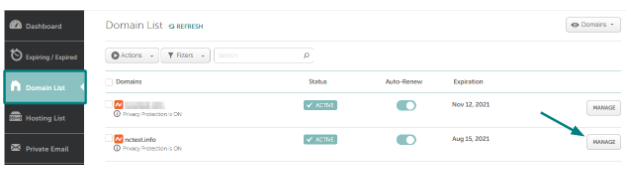
Go to the Domain List: On the left-hand sidebar of your dashboard, click Domain List.
Then locate the domain you want to transfer and click the Manage button next to it.
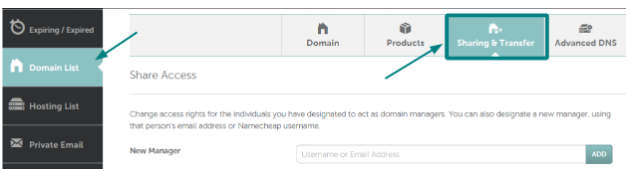
Open the Sharing & Transfer Tab: At the top of the page, select Sharing & Transfer to access domain transfer options.
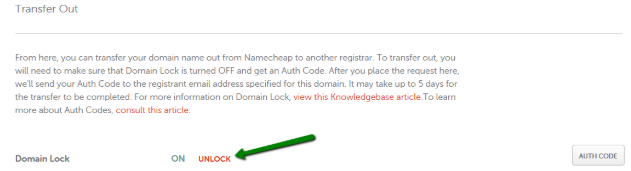
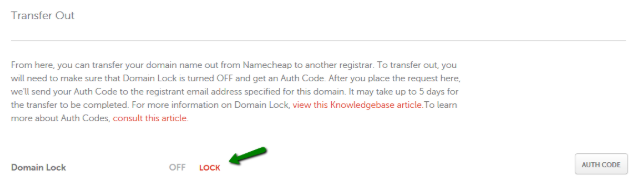
Disable the Domain Lock: Scroll down to the Transfer Out section > Click on Unlock next to the Domain Lock option.
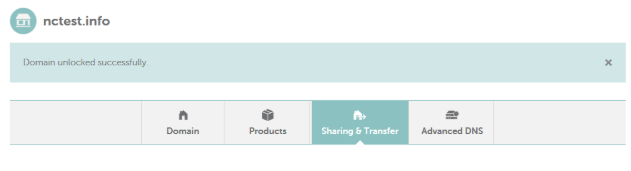
After you disable the lock, a confirmation message will appear stating that the domain is now unlocked and ready for transfer.
(Optional) Re-Locking Your Domain
If you decide not to proceed with the transfer or simply want to secure your domain again, you can re-enable the domain lock.
- In the same section, clickSharing & Transfer next to the Domain Lock option.
You’ll receive a message confirming that the domain is locked for protection.
Need Help?
If anything seems unclear or you're stuck at any step, the Vivint Host Support Team is here for you 24/7. We’re always ready to help you manage your domain securely and confidently.