

How to Transfer a Domain to Vivint Host
Moving your domain to Vivint Host is a simple, secure process that helps you manage everything in one place — from hosting to domain renewals. Follow this step-by-step guide to transfer your domain registration to Vivint Host with minimal hassle.
Note: Transferring a domain is not the same as migrating your website. This article focuses only on moving your domain registration to Vivint Host. If you're looking to move your website and files, please refer to our website migration guide.
Step 1: Unlock Your Domain & Retrieve the EPP/Auth Code
Before you can begin the transfer process, you need to log in to your current domain registrar and unlock your domain. Domain locking is a security measure to prevent unauthorized transfers. Most registrars allow you to unlock your domain with a single click.
Next, locate your EPP code (also known as an Auth code). This unique code is required to authorize the transfer. You'll usually find it in your domain management dashboard.
Important: If you registered your domain within the last 60 days or made changes to the contact details recently, a transfer lock might still be active. In such cases, you may need to wait for the 60-day period to pass or contact your current registrar to lift the lock manually.
Here are direct guides for some popular providers:
- GoDaddy
- NameCheap
- Domain.com
- iPage
- HostGator
Step 2: Check Availability and Start Your Transfer
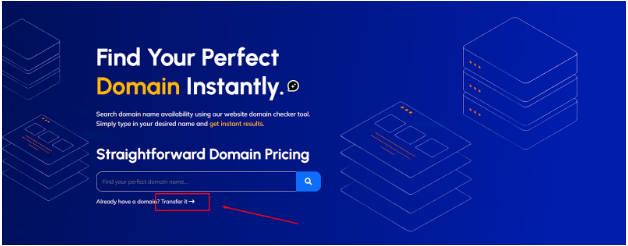
Go to our Instant Domain Search, type your domain name, and click the Transfer option. This checks whether your domain is eligible to be transferred to Vivint Host.
Step 3: Enter Your EPP/Auth Code
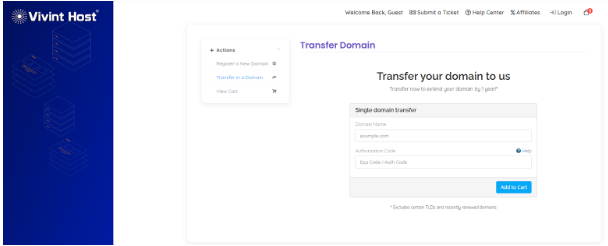
You’ll be prompted to enter the EPP/Auth code you got from your current registrar. Double-check the code to ensure accuracy. A valid code is required to proceed with the transfer.
Click Add to Cart once you’ve entered the correct code.
Step 4: Domains Configuration
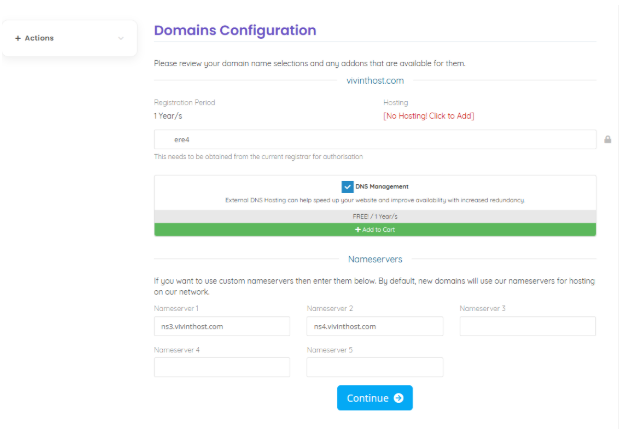
Please review your domain name selections and any addons that are available for them.
Domain: yourdomain.com
- Registration Period: 1 Year/s
- Hosting: [No Hosting! Click to Add]
- Transfer Authorization: This needs to be obtained from the current registrar for authorization
- DNS Management: External DNS Hosting can help speed up your website and improve availability with increased redundancy.
FREE! / 1 Year/s – Add to Cart
Nameservers:
If you want to use custom nameservers then enter them below. By default, new domains will use our nameservers for hosting on our network.
- Nameserver 1: ns3.vivinthost.com
- Nameserver 2: ns4.vivinthost.com
- Nameserver 3:
- Nameserver 4:
- Nameserver 5:
Click Continue when you're ready.
Step 5: Review & Checkout
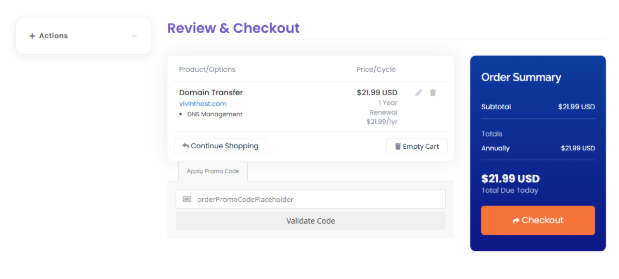
If you're transferring multiple domains, repeat the above steps and add each to your cart. Once you’re done, review everything before proceeding.
Step 6: Complete the Payment
Log in if you're already a Vivint Host customer by clicking the Already Registered button. New customers will need to provide accurate personal details and set a 4-digit support PIN.
Choose your preferred payment method. For domains, we recommend using a debit/credit card (Visa, Mastercard, Discover, or American Express). This ensures your domain can auto-renew each year.
Note: PayPal and crypto-based methods like Coinbase do not support domain auto-renewals. Using a credit card is the safest method to prevent accidental expiry.
Before finalizing the payment, review our Terms of Service and Payment Policy. Domain transfers are non-refundable because they're submitted instantly to the global registry.
Step 7: Wait for the Transfer to Complete
After your payment, your domain will show as Pending inside your Vivint Host Client Portal.
No need for further action-he transfer will automatically finalize when your current registrar approves it. Most transfers are completed within 2-5 business days.
Some providers, like GoDaddy, can speed this up if you contact them to manually approve the transfer.
Once complete, you’ll receive a confirmation email.
Step 8: Verify Your Email Address
ICANN requires email verification for all new domain transfers. Within hours of your domain becoming active, you’ll receive an email with a verification link.
Action Required: You must click the link within 15 days to avoid suspension of your domain. Check your Spam folder if you don’t see it in your inbox.
Failure to verify your email will place your domain on hold, and your website will go offline until verification is completed.
Common Questions
Q: Will my website go down during the domain transfer? No, as long as your DNS or nameservers remain the same during the transfer, your site will stay live.
Q: Can I transfer a recently purchased domain? If it's under 60 days old or if you've recently changed contact details, ICANN rules prevent immediate transfer.
Q: Is domain transfer the same as moving my website? No. Domain transfer moves your domain registration to Vivint Host, not your website files or emails.
Q: How long does the process take? Generally, 2-5 business days. Some registrars allow you to expedite the process manually.
What’s Next?
Congratulations! Once your domain transfer is complete and your email is verified, you're officially on Vivint Host.
Here are your next steps:
- Set up domain-related services: Configure email hosting, SSL certificates, or connect your domain to your website.
- Explore your Vivint Host dashboard: Manage renewals, DNS, hosting, and support all in one place.
- Enable auto-renew: Never lose your domain—make sure auto-renew is activated.
Need help? Our 24/7 support team is ready to assist you anytime.