

How to Access Vivint Webmail
Managing your email should be simple, fast, and secure-just like your hosting. With Vivint Host, you can access your email account anytime using a web-based interface through cPanel. This guide walks you through how to access Roundcube webmail, the preferred email client on Vivint Host’s servers.
Accessing Webmail Through cPanel
Follow these steps to open your inbox directly from your cPanel account:
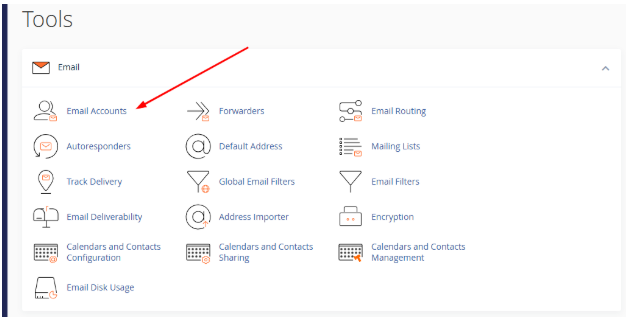
- Log into your cPanel account: Once you're logged in, scroll to the Email section and click on Email Accounts.
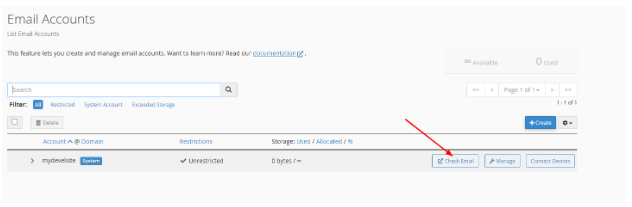
Locate your email address: Find the email account you want to access, then click on the Check Email button next to it.
- Choose your webmail application: If you haven’t set a default, you’ll be asked to choose a webmail client. Click on the Roundcube icon to continue.
Note: If Roundcube is already your default webmail client, you’ll be taken directly to your inbox.
Inside Roundcube, you can:
- Read and reply to emails
- Compose new messages
- Organize messages using folders
- Manage settings for better organization
Accessing Webmail Directly (Without Logging into cPanel)
You can also open your email inbox using a direct webmail URL-ideal for quick access when you're not logged into cPanel.
Use this format:
http://yourdomain.com/webmail
- Enter your email address and password.
- Click the Log In button.
This will take you straight to your Roundcube inbox, where you can manage all your emails on the go.
Security Tip
Make sure to keep your email login credentials safe. Avoid sharing your password and always log out when using shared or public devices.
If you encounter any issues or need help setting up your email client, Vivint Host’s support team is available 24/7 to assist you.