

How to Create and Manage Email Aliases – A Simple Guide
Email aliases are a powerful way to streamline your inbox without creating multiple email accounts. An alias acts as a forwarding address, directing emails to an existing mailbox. For example, if you want emails sent to help@yourdomain.com to also land in support@yourdomain.com, setting up an alias makes it happen seamlessly.
At Vivint Host, we want to ensure you get the most out of your email management. Below, we’ll walk you through the steps to set up an email alias-keeping things simple, secure, and efficient.
What is an Email Alias?
An email alias is a virtual address that forwards messages to your primary inbox. Unlike a full mailbox, you cannot send emails from an alias-it’s purely for receiving and forwarding.
Key Points to Remember:
- Each alias must be unique across your domain-no duplicates.
- Aliases do not support sending emails (you’ll need a full mailbox for that).
- Different hosting plans offer varying alias limits (more on this below).
How to Create an Email Alias
Follow these steps to create an alias for a mailbox in your Vivint Host Private Email:
1. Log in to your Vivint Host account
Go to your account and sign in with your login details.
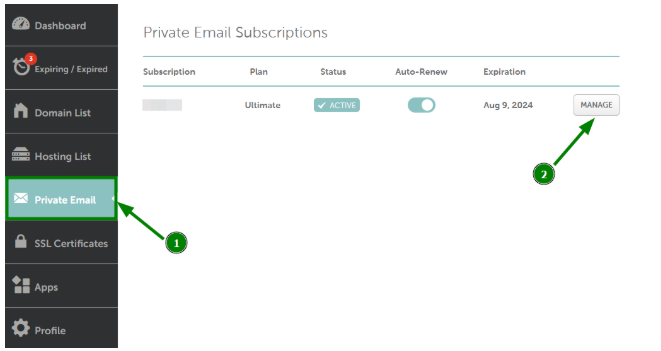
2. Go to the Private Email section
In the left-hand menu, click on Private Email, then click Manage next to the email plan where you want to create the alias.
3. Scroll to Mailboxes Management
Go down to the section that lists your mailboxes.
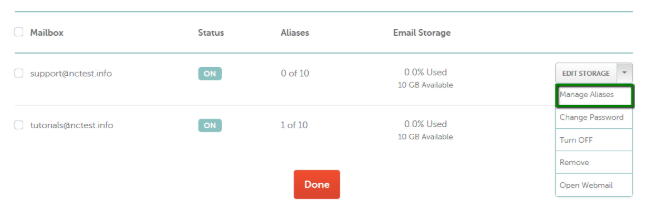
4. Click on "Manage Aliases"
Next to the email account you want to add an alias to, select Manage Aliases from the drop-down menu.
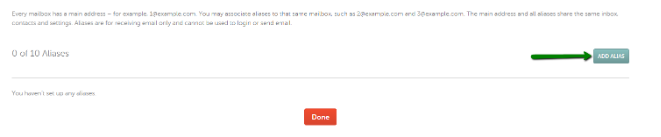
5. Click "Add Alias"
To begin creating the alias, click the Add Alias button.
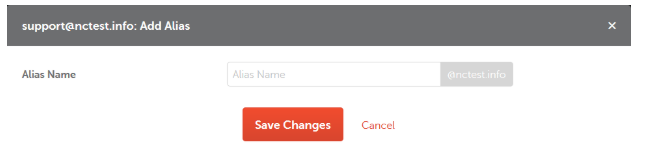
6. Enter the Alias Name
Type in the alias name you want to use, then click Save Changes to apply it.
Alias Limits Based on Your Plan
Depending on your hosting or email plan, you may have different alias allowances:
|
Plan Type |
Alias Limit per Mailbox |
|
Starter |
10 aliases |
|
Professional |
50 aliases |
|
Ultimate |
Unlimited aliases |
Need more flexibility? You can also set up a catch-all email, which forwards all unmatched emails (even misspelled ones) to a designated mailbox. However, be cautious-this can also attract spam.
Need More Aliases? Try the Catch-All Option
If you want to receive emails sent to incorrect or non-existent addresses under your domain, you can turn on the catch-all option. This feature sends any email addressed to something like wrongname@yourdomain.com to a chosen mailbox.
This helps you avoid losing emails due to typos or unknown addresses.
However, be careful:
Enabling catch-all can increase spam since it accepts messages sent to any address under your domain-even ones created randomly by spammers.
You can find a step-by-step guide on setting up catch-all in Vivint Host Private Email here.