

How to Troubleshoot SSL Errors (Not Secure, Redirect Loops)
Once you’ve installed an SSL certificate to secure your website, the next step is enabling HTTPS across your entire site. This ensures that all your visitors connect securely. However, in some cases, you might run into SSL-related issues like your site showing as “Not Secure” or getting stuck in a redirect loop with errors like ERR_TOO_MANY_REDIRECTS.
These errors can be frustrating, but the good news is that they’re usually caused by a few common misconfigurations. Here’s how to troubleshoot and fix them.
Common Causes & How to Resolve Them
1. Conflicting or Repeated Redirect Rules
One of the most frequent causes of redirect loops is having multiple or conflicting redirection rules in your .htaccess file.
What to Do:
- Temporarily disable your .htaccess file by renaming it (for example, to .htaccess_backup).
- Open your site in incognito/private browsing mode and check if it loads without errors.
- If the site works, your issue likely lies within the .htaccess file.
- Reactivate the file and review each redirect rule carefully. Enable them one at a time to pinpoint the conflicting line.
Tip: If you're unsure about the redirect rules or the structure of the file, consider consulting your web developer or reach out to our support team at Vivint Host.
Also, check for redirects set up from your hPanel or hosting control panel. Duplicate rules from multiple places can also trigger redirect loops.
2. Incorrect Cloudflare SSL Settings
If your domain uses Cloudflare for DNS or performance optimization, a mismatch in SSL settings may be the cause.
What to Check:
- Log into your Cloudflare dashboard.
- Go to the SSL/TLS tab and verify the encryption mode (e.g., Flexible, Full, or Full (Strict)). For most setups using an SSL certificate on the server, Full or Full (Strict) is recommended.
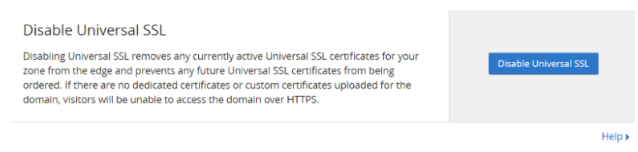
- Then, navigate to SSL/TLS → Edge Certificates and make sure that Universal SSL is enabled.
Tip: Disabling Universal SSL or using the wrong mode can cause your browser to receive conflicting HTTPS signals, leading to a redirect loop.
3. Incorrect Site URL in WordPress Database
If your website is powered by WordPress, incorrect settings in your database could also lead to HTTPS issues.
Here’s How to Fix It:
- Access your phpMyAdmin via your hosting dashboard.
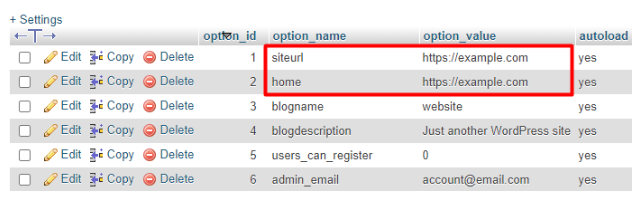
- Find the wp_options table.
- Locate the rows labeled siteurl and home. Make sure both values begin with https:// instead of http.
Example:
- siteurl > https://yourdomain.com
- home > https://yourdomain.com
If not, update both values to start with https and save the changes.
A mismatch here can send browsers into an endless loop as WordPress keeps redirecting between http and https.
Final Notes from Vivint Host
SSL errors and redirect loops are usually fixable once the root cause is identified. Whether it’s a misconfigured redirect, a Cloudflare setting, or a database issue in WordPress=each fix only takes a few steps.
If you’re hosting with Vivint Host, our support team is here 24/7 to walk you through these issues or handle them for you. We’re committed to ensuring your website remains fast, secure, and reliable every step of the way.