

How to Use DNSSEC for Enhanced Security
DNSSEC (Domain Name System Security Extensions) is a security protocol that adds digital authentication to your domain’s DNS records. It ensures that the DNS data your visitors receive hasn’t been altered in transit, protecting your website from common threats like DNS spoofing or cache poisoning.
DNSSEC works by applying digital signatures to your DNS records. These signatures are then verified during lookups, confirming that the response is authentic and has not been tampered with.
Does Vivint Host Support DNSSEC?
If your domain is registered with Vivint Host and is pointing to our nameservers, there’s no need to enable DNSSEC manually. Our infrastructure already includes DNS security features to protect your domain, and therefore DNSSEC management is not available in this setup.
How to Add DNSSEC Records (For Domains Pointing Elsewhere)
If your domain is registered with Vivint Host but uses nameservers from another provider (like Cloudflare), and if your domain’s extension (TLD) supports DNSSEC, then you can manually add DNSSEC records by following these steps:
Step 1: Access Your Domain Management
- Log in to your Vivint Host Dashboard.
- Go to the Domains section.
Click on the domain name, or use the ellipsis (…) to select Manage.
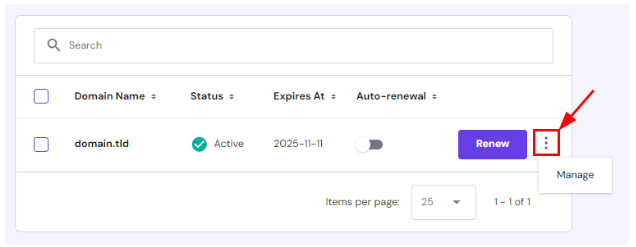
Step 2: Open the DNS / Nameservers Settings
In the left-hand menu, click on DNS / Nameservers.
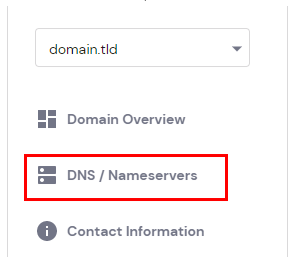
Step 3: Navigate to the DNSSEC Tab
Once on the DNS page, click the DNSSEC tab.
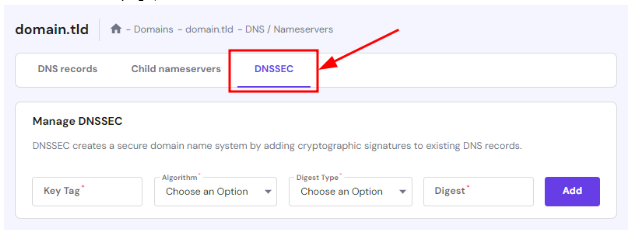
Step 4: Enter DNSSEC Record Details
You’ll be prompted to enter the following fields:
- Key Tag
- Algorithm
- Digest Type
- Digest Value
Once all fields are completed correctly, click Add to save the DNSSEC record.
Note: If you don’t see the DNSSEC option or if it’s grayed out, your domain's TLD may not support DNSSEC.
Where Do You Get DNSSEC Record Values?
The DNSSEC values must come from the provider where your domain is currently pointed via nameservers. These values are generated on that external platform.
For example:
- If your domain points to Cloudflare, you can get your DNSSEC values by visiting Cloudflare’s DNSSEC management section.
Each provider has its own process to generate these records, so refer to their documentation for accurate steps.
How to Remove DNSSEC Records
If you need to delete a DNSSEC record:
- Go to the DNSSEC tab in your domain settings.
- Find the existing record.
Click the Delete button next to it.
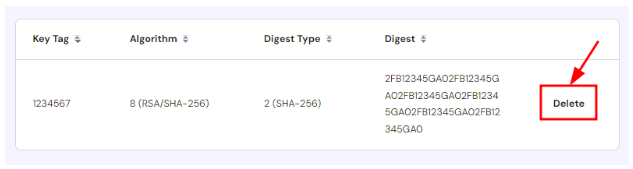
If you want to disable DNSSEC completely, make sure to remove the record from Vivint Host and also disable DNSSEC in the DNS settings of the external provider where your domain is currently managed.
Need Help?
Not sure whether DNSSEC is right for your setup? Our 24/7 expert support team is ready to help. Whether you’re troubleshooting or setting things up, we’re here to make the process easier.