

How to Check Domain Availability and WHOIS Status
Before purchasing a domain, it's essential to confirm whether it’s available for registration or already taken. At Vivint Host, our domain search tool helps you quickly find the perfect domain name and check its WHOIS details—so you know exactly who owns it and when it might become available again.
This guide will show you how to:
- Search for domain availability
- View WHOIS records for any domain
- Understand key WHOIS information
Step 1: Go to the Domain Search Page
You’ll see a domain search bar at the top of the page.
Step 2: Enter Your Desired Domain Name
Type in the domain name or keyword you’re interested in. Example: yourbrandname.com or just yourbrandname.
- Click the Search or Check Availability button.
- Vivint Host will instantly show you: If the domain is available or already registered
Other related suggestions and available extensions like .net, .org, .online, etc.
Step 3: If Available – Add to Cart
If the domain is available, you’ll see a message like: “Congratulations! yourbrandname.com is available.” Click Add to Cart to continue to checkout and secure your domain.
Step 4: If Not Available – Check WHOIS Information
If the domain is already taken, you’ll see a “Not Available” status. In this case, you can:
- Try a variation or different extension
- View WHOIS details to see when the domain was registered, when it expires, and who owns it (if public)
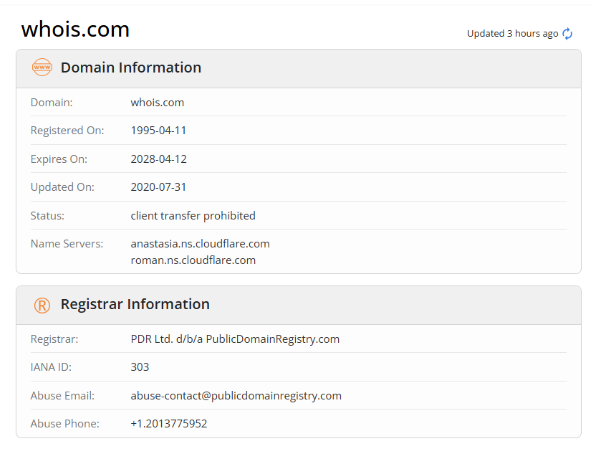
What Information Will You See in WHOIS?
- Domain Registrar – The company through which the domain was registered
- Registration Date – When the domain was created
- Expiration Date – When the current registration ends
- Domain Status – Whether it's active, in redemption, or on hold
- Owner Info – If not protected by privacy, the name and contact of the registrant
A Note on Domain Privacy
Many domain owners enable privacy protection (also offered by Vivint Host), which hides personal contact info from public WHOIS records. If a domain’s details are hidden, you may not see the owner’s name or email.
Next Steps
If your domain is available > Register it immediately to avoid losing it
If your desired domain is taken >
- Explore WHOIS to see when it expires
- Try alternative extensions or similar names
- Consider reaching out to the owner via WHOIS (if public)
Start Searching Now
Find the domain that fits your brand and get started with Vivint Host's fast and secure domain registration system.
Need help choosing the right domain or understanding WHOIS results? Our support team is here 24/7 to assist you.