

How to Stop Your Emails from Going to Spam
If you’ve ever sent out an important email only to find it landed in the recipient’s spam folder, you’re not alone. Even legitimate emails can be flagged incorrectly. With email filters getting smarter every day, it’s important to know what triggers them-and more importantly, how to avoid those triggers.
In this guide, we’ll explain why your emails might be marked as spam and show you clear, actionable steps to ensure your messages reach the inbox.
What Happens When Emails Go to Spam
When your emails are flagged as spam, your audience might never see them. This is more than just a missed message-it can damage your sender reputation, which email services track carefully.
If your email reputation drops, future emails may go straight to spam by default, even if they’re clean and well-written. Over time, this affects your ability to communicate with customers, reduces engagement, and can hurt your business image.
The good news? Most of these issues are preventable.
3 Ways to Keep Emails Out of the Spam Folder
Let’s look at the top methods that help your emails land safely in the inbox.
1. Add an Easy-to-Find Unsubscribe Link
Some users will want to stop receiving your emails eventually-and that’s completely fine. What’s important is to give them a clear and easy way to unsubscribe.
If people can’t find a way to leave your list, they may mark your email as spam. This not only affects that one message, but also your future deliverability.
Tip: Most email services automatically include an unsubscribe link. Make sure it’s visible and working. It’s also legally required in many countries.
2. Stay Away from Spam Trigger Words
Some words raise red flags for spam filters, especially when used in subject lines. These are often linked to aggressive sales language or unrealistic promises. Here are a few examples to avoid:
- Free gift
- Act now
- Save big money
- You’ve been selected
- 100% guaranteed
Instead, keep your message natural and genuine. Use clear language and offer real value to your readers. If you’re not sure about your email, you can run it through a spam-checking tool like Mail Tester before sending.
3. Choose a Reliable Email Hosting Provider
Not all email hosts are created equal. The provider you use plays a big role in your sender reputation and whether your emails make it to the inbox.
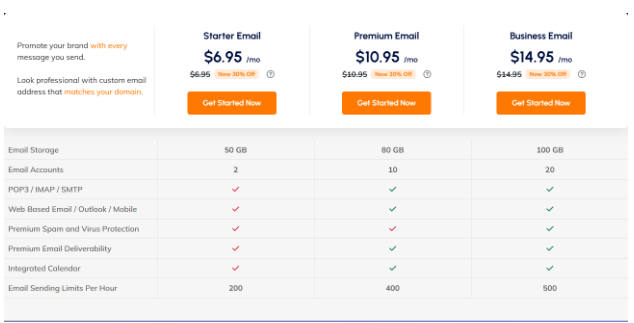
With Vivint Host, you benefit from:
- Clean IP reputation (thanks to SSD-only, secured infrastructure)
- Dedicated IP options
- Consistent deliverability
- Advanced spam protection
- 24/7 support for email issues
If you’re sharing an IP with other senders who have a poor track record, it could harm your email success-even if your messages are well-written and clean. Using a provider with strong infrastructure helps you avoid this risk.
Why Vivint Host is a Smart Choice for Email
At Vivint Host, we take email delivery seriously. Whether you’re sending newsletters, client updates, or business offers, our cloud infrastructure ensures that your emails have the best chance of reaching the inbox.
Here’s how we help:
- Secure email systems with spam and malware filtering
- Dedicated IP addresses for better sender reputation
- Email hosting options tailored for businesses
- 24/7 expert support to assist with any issues
If your current email setup is giving you trouble, we’re here to help you fix it.
Final Thoughts
Spam filters are there for a reason-but they can sometimes get it wrong. If you’re not careful, your emails might end up in the junk folder even when they don’t belong there.
To avoid this, remember the three golden rules:
- Always add an unsubscribe link
- Avoid spammy language
- Use a trusted email service like Vivint Host
Need help setting up email the right way? Reach out to our support team anytime-we’re here 24/7.